


How to Connect to Naha Airport Free Wi-Fi (Step-by-Step Guide)
[This article may contain PR]
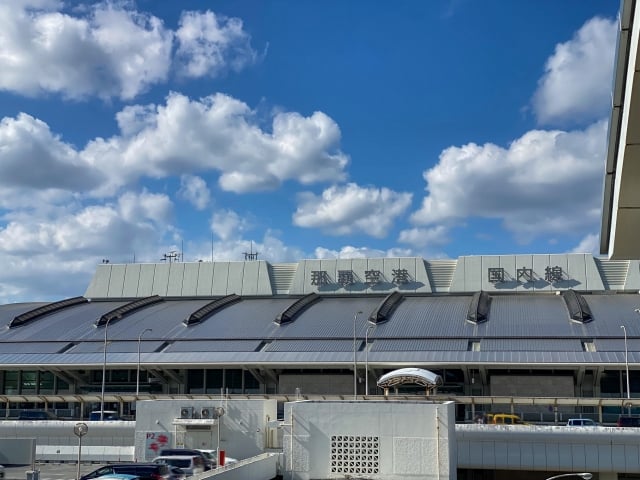

In recent years, not only Japanese tourists but also foreign tourists have been increasing, and Naha Airport has become a place where souvenir stores, restaurants, and other nearby facilities are well-stocked.
Naha Airport has free Wi-Fi (Naha-airport Wi-Fi), which anyone can use free of charge.
Below, we introduce how to use and connect to the free Wi-Fi at Naha Airport.

How to Connect to Naha Airport Free Wi-Fi (Step-by-Step Guide)
How to use and connect to Naha Airport’s free Wi-Fi is as follows.
- Open the Wi-Fi settings screen of the device (smartphone, tablet, etc.) you wish to connect to.
- Select SSID (Free_Wi-Fi_NAHA_Airport) on the Wi-Fi setting screen.
- When the Wi-Fi symbol appears on the device you wish to connect to, the connection is complete.
Points to keep in mind when using Naha Airport’s free Wi-Fi
The advantage of free Wi-Fi is that there is no need to register as a member, and there is no limit to the number of times you can connect or use the service.
However, depending on how you use it and where you use it, you may encounter problems such as slow connection or sudden loss of Wi-Fi connection.
In such cases, try turning off the Wi-Fi connection once, moving to a different location or giving it some time, and reconnecting.

Areas and locations where Naha Airport’s free Wi-Fi is available
Free Wi-Fi at Naha Airport is available at the following locations.
<1F Arrivals lobby and Entrance lobby>
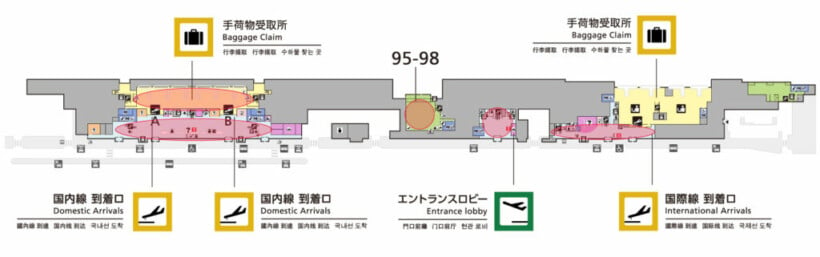
(Source: Naha Airport Official Website)
<2F Departure lobby and boarding area>
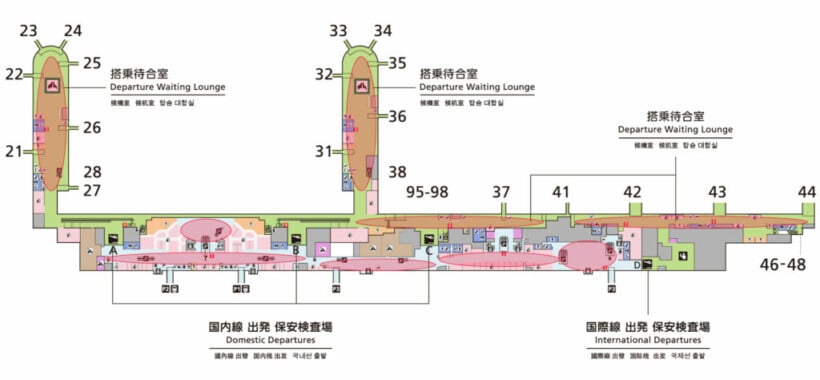
(Source: Naha Airport Official Website)
<3F Check-in lobby>
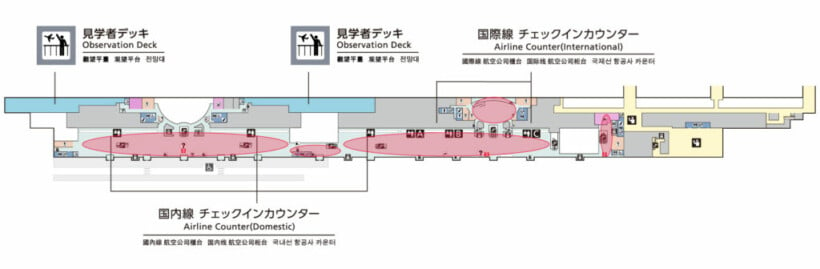
(Source: Naha Airport Official Website)
<4F Restaurant>

(Source: Naha Airport Official Website)
What to do if Naha Airport’s Free Wi-Fi Doesn’t Work…
As you can see, Naha Airport offers free Wi-Fi that anyone can use for free 24 hours a day and does not require membership registration.
On the other hand, there are some disadvantages, such as slow connections and sudden disconnections.
In such cases, it is recommended to consider other connection methods besides free Wi-Fi, such as bringing a pocket Wi-Fi device that can be carried easily or purchasing an eSIM that can be used immediately after registration.

A Guide to Accessing Free Wi-Fi in Ota Ward, Tokyo (OTA CITY FREE Wi-Fi)
Navigating Free Wi-Fi Connectivity in Shinjuku City (Shinjuku Free Wi-Fi)

Here’s How To Connect to Fukuoka City’s Free Public Wi-Fi (Fukuoka City Wi-Fi)
Connecting to Free Wi-Fi at Asahikawa Airport: Everything You Need to Know (.AsahikawaAirport_Free_Wi-Fi)

How to Use Obihiro City’s Free Wi-Fi (OBIHIRO FREE Wi-Fi)
How to use and connect to Minato ward’s free Wi-Fi (Minato City Wi-Fi)
On the lifestyle web magazine "Minna no Rakuraku Magazine",
we update useful tips and deals every month. Please bookmark us!
- How To Use and Connect to Sapporo City’s Free Wi-Fi (sapporo_city_Wi-Fi)
- How to Use and Connect to Free Wi-Fi at Tokyo Station